Beyond Reading,
Into Insight.
A local-first AI RSS reader: auto summaries, cited chat, and scheduled briefs. Your data stays in the browser by default.


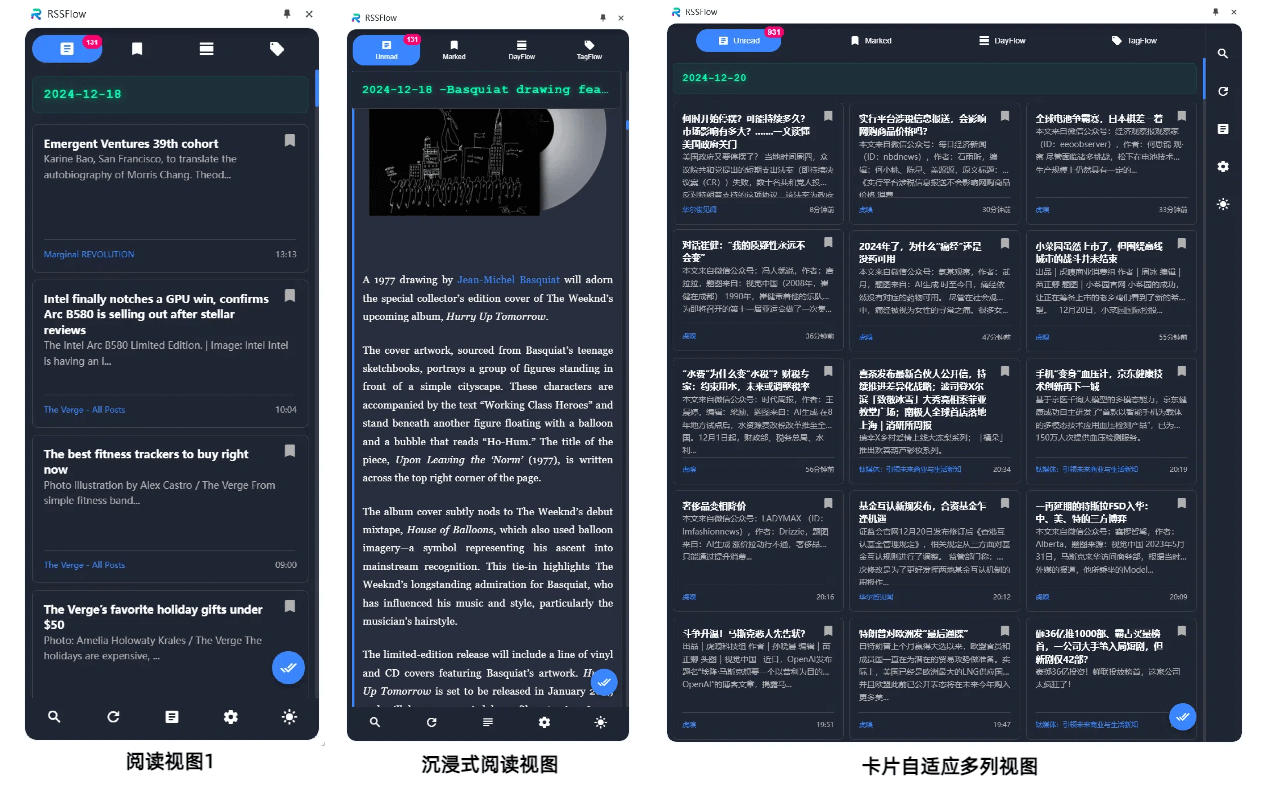
Redefining Reading
with AI.
From auto-summaries and cited chat to knowledge graphs, topic galaxies, and unattended workflows—RSSFlow turns RSS into a practical local information system.
AI Pre-read, Structured Points
Background summaries, tags, and scores. Decompose first, then deep-read—fuel for chat, reports, and filters.
Cited Chat, Traceable Answers
Q&A over article sets with clickable citation badges—hover to preview, click to open the source.
23 Expert Commands
One-tap roles for research, macro, risk, writing, crypto, and more—or add your own prompts.
Unattended Workflows
Scheduled fetch + AI analysis with single, chain, and split-merge modes. Push or publish reports.
Multi-channel Push
Telegram, Feishu webhooks, and desktop alerts for summaries, briefs, and hotspots.
MCP for AI Tools
Expose local RSS context to Cursor, Claude, and other agents via MCP.
Graph & Topic Galaxy
Co-occurrence graphs plus a 3D topic universe—from facts to second-order effects.
Zen Reader & SnagFlow
Keyboard-first immersive reading; SnagFlow turns any page into importable RSS.
Local-first & Cloud Reports
Data stays on-device by default; optionally publish to a report portal or blog.
From subscribe to share, your feed keeps moving.
You don’t need every feature at once. Follow these 5 steps to turn RSS from a pile of links into something you can scan, ask, schedule, and share.
Subscribe
Paste RSS, import OPML, or use SnagFlow to turn almost any page into a feed.
Auto-organize
New items get summaries, tags, and scores in the background—scan first, deep-read later.
Ask & connect
Chat over a set of articles with citations, or explore links in Graph and topic views.
Run on a schedule
Workflows fetch and draft briefs on a timer so results are ready before you start work.
Push & publish
Send to Telegram / Feishu, or publish to a report portal or blog for phone-friendly reading.
- 01
Subscribe
Paste RSS, import OPML, or use SnagFlow to turn almost any page into a feed.
- 02
Auto-organize
New items get summaries, tags, and scores in the background—scan first, deep-read later.
- 03
Ask & connect
Chat over a set of articles with citations, or explore links in Graph and topic views.
- 04
Run on a schedule
Workflows fetch and draft briefs on a timer so results are ready before you start work.
- 05
Push & publish
Send to Telegram / Feishu, or publish to a report portal or blog for phone-friendly reading.
Reports you can actually use
Workflows do more than run in the background. Each run can produce a clean HTML brief—preview in the browser, or publish to your portal/blog for reading on the phone.
Financial Insight Report
Financial
Automatically generated after daily close. Extracts key events, sentiment weight, and trend analysis. Supports export as an independent interactive page.
24h Global Hotspots
Hotspots
Real-time discovery of trend inflection points. Extracts key events, sentiment weight, and trend analysis. Supports export as an independent interactive page.
Tech Trend Briefing
Tech
Automatic cross-language aggregation. Extracts key events, sentiment weight, and trend analysis. Supports export as an independent interactive page.
Data ownership ultimately
belongs to you.
RSSFlow adopts a local-first architecture. Your reading history and AI summary data are stored in local IndexedDB. Combined with Ollama local LLM support, sensitive data completes deep processing without leaving your computer.
Zero Cloud Sync
We don't collect reading preferences or upload subscription lists. Truly free reading. (Only when you actively enable 3rd-party AI or push features, necessary data is sent to providers.)
Local IndexedDB
High-performance local database supporting smooth scrolling of tens of thousands of items.
Ready to Supercharge Your Information Intelligence?
Unlock 23 expert commands, Discovery galaxy, and unlimited scheduled briefs. License up to 3 devices; libraries stay local by default.
Pro Monthly
FlexibleUnlock all 23 expert prompts & automated reports
Pro Annual
Popular · Save 17%Monthly quotas plus two brand-new 1:1 Skills
Pro Lifetime
Annual perks + custom-styled site + VIP on later oinchain software